In the past, coal miners would enter underground tunnels carrying a canary in a cage. If the bird stopped singing, it was a warning that there was toxic gas in the air and it was time to escape.
We face a similar challenge in security. Many intrusions go undetected for weeks or months. By the time the attacker is discovered, they have already moved through the network, copied what they wanted, and left. Canary tokens propose a very simple idea: place small enticing traps in strategic locations and wait for someone to trigger them.
In this article, we will explore what canary tokens are, how they work, how to deploy them in minutes, and the scenarios in which they can be useful.
(Free access, no subscription required)
What Are Canary Tokens?
A canary token is a digital decoy, such as a file, credential, URL, or domain name, that has no legitimate use. No one should ever open or use it. Therefore, if someone finds and uses one, the token triggers an alert providing clear evidence of access, leaving little room for doubt.
Canary tokens are based on a simplified version of the concept behind a honeypot. There is no need to set up a complex server or simulate a service. All you have to do is place the decoy where an attacker is likely to look and configure where the alert should be sent.
How Do They Work?
Each token carries a unique identifier that triggers an action when activated. This action might be a DNS query, an HTTP request, or the use of a credential against a cloud service.
What Are Canary Tokens?
A canary token is a digital decoy, such as a file, credential, URL, or domain name, that has no legitimate use. No one should ever open or use it. Therefore, if someone finds and uses one, the token triggers an alert providing clear evidence of access, leaving little room for doubt.
Canary tokens are based on a simplified version of the concept behind a honeypot. There is no need to set up a complex server or simulate a service. All you have to do is place the decoy where an attacker is likely to look and configure where the alert should be sent.
How Do They Work?
Each token carries a unique identifier that triggers an action when activated. This action might be a DNS query, an HTTP request, or the use of a credential against a cloud service.
For example, a Word document might contain a reference to a remote resource hosted at a unique URL. When the document is opened in Microsoft Office, the program attempts to load that resource, and the token’s server logs information such as the IP address, date, time, and user agent. Seconds later, an alert arrives via email or webhook.
A DNS token can work even on networks that block outbound Internet access, as the query travels through the recursive resolver to the authoritative server for the token’s domain.
How to Deploy Canary Tokens
The best-known tool is CanaryTokens, created by Thinkst. It is available at no cost through canarytokens.org and does not require user registration. Given its open-source nature, any organization can host its own instance using Docker.
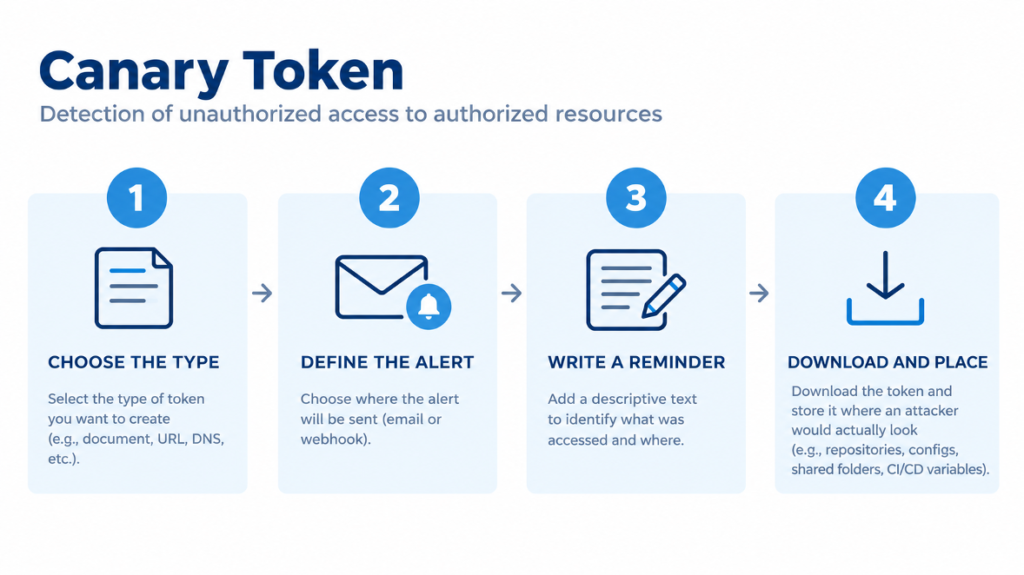
Creating a token takes just a few minutes:
Select the type of token you wish to create: Office documents or PDFs, URLs, DNS records, QR codes, API keys (such as AWS or SendGrid), SQL Server databases, decoy executables, or fake login pages, among others.
Specify the destination where the alert will be sent, either an email address or a webhook that forwards alerts to Slack, Teams, or your SIEM.
Write a descriptive reminder, for example, “payroll spreadsheet on the HR file server.” When the alert arrives, this text will tell you what resource was accessed and where.
Download the token and store it in a location where an attacker would actually look: code repositories, configuration files, shared folders, or CI/CD variables.
A few best practices make a difference. It is advisable to use a different token for each location; this way, when one is triggered, you know the attacker’s point of entry. It also helps to assign them credible names (e.g., AWS_CREDENTIALS raises less suspicion than CANARY_AWS) and to test them after installation to confirm the alert is received. If a token is triggered, you should ideally preserve it for forensic analysis and replace it with a new one.
This technique works in the real world: in 2025, Grafana Labs detected an intrusion when an attacker who had stolen secrets from their GitHub repositories attempted to validate an AWS key that was, in fact, a canary token. The alert was received instantly, and the incident was contained within minutes.
Use Cases
Intruder detection: fraudulent credentials in a ~/.aws/credentials file, in application configuration settings, or anywhere in a source code repository. An attacker who discovers these credentials will almost always attempt to validate them.
Document leaks: a PDF or Word document with an eye-catching filename that triggers an alert when opened, even from outside our network.
Unauthorized internal access: a file with an enticing name placed in a shared folder that should only be accessed by a specific department or team.
Cloned phishing sites: a snippet of code embedded in our site that alerts us if the page is duplicated and published on another domain.
The most frequently cited case is that of Grafana Labs. In April 2025, an attacker exploited a misconfigured GitHub Actions workflow to steal secrets. Among them was a decoy AWS key. When the attacker validated this key using an automated tool, the alert was triggered immediately, and the team contained the intrusion within minutes.
Key Considerations
Canary tokens do not replace other security controls. When a canary token is triggered, an intruder has already gained access. Their value lies in shortening the time between intrusion and detection.
They also have limitations. Publicly available token services use well-known domains, and some attacker tools can recognize canary tokens without actually triggering them. Installing a proprietary instance with a custom domain reduces this risk, although certain token types such as AWS keys require additional infrastructure.
Finally, an alert is only effective if someone reads it. It is important to route alerts to a channel the team actively monitors and to have a clear plan of action for when an alert arrives. This could be a dedicated dashboard within our SIEM or monitoring system.
Final Thoughts
Canary tokens are based on a deceptively simple idea: if something should not be touched, viewed, or executed, any interaction is an alert signal. This simplicity is their greatest strength. With just a few minutes of work and no financial cost, we can plant a network of small alarms that generate almost no false positives and require very little maintenance.
The technique itself is not new. It is the same method used by hidden pixels in marketing emails to track whether a recipient has opened a message. The difference here is that we are applying it for defensive purposes.
Canary tokens do not prevent an attack or replace other security controls, but they introduce a key change: rather than finding out months later, they alert us while there is still time to act. Like the miner’s canary, they do not eliminate the danger, but they offer us the opportunity to react before it is too late.
A good starting point is to create an AWS credential token today and place it in an internal repository. It is the simplest type of trap and, as the Grafana Labs incident showed, one of the most effective.